





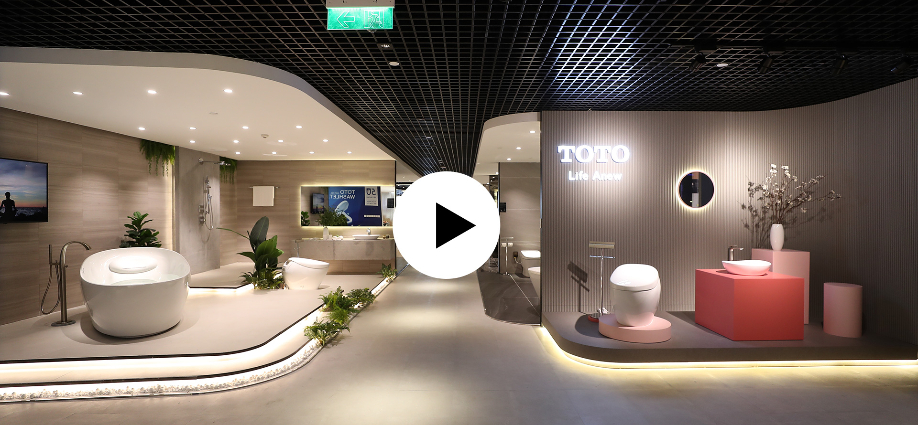
Matterport Demo
Walk through the space before visiting it.
A clean digital twin helps customers understand flow, scale, layout and details without waiting for an on-site appointment.
Open demo tourSpatial Media Has Changed
A virtual tour should be more than a nice walkthrough.
The best 360VR experiences now work as a sales tool, training asset, remote inspection layer and always-on property presentation. The viewer should know where to go, what matters and what action to take next.
- Show the entire space with an intuitive navigation path.
- Add product, room, equipment, safety or sales information through hotspots.
- Export stills, floor plans, short videos and social assets from the capture.
What We Build
Digital twin and 360VR assets for business spaces.
Choose Matterport when you need a polished 3D digital twin. Choose custom 360VR when you need flexible branding, custom UI, lighter hosting or a specific sales journey.

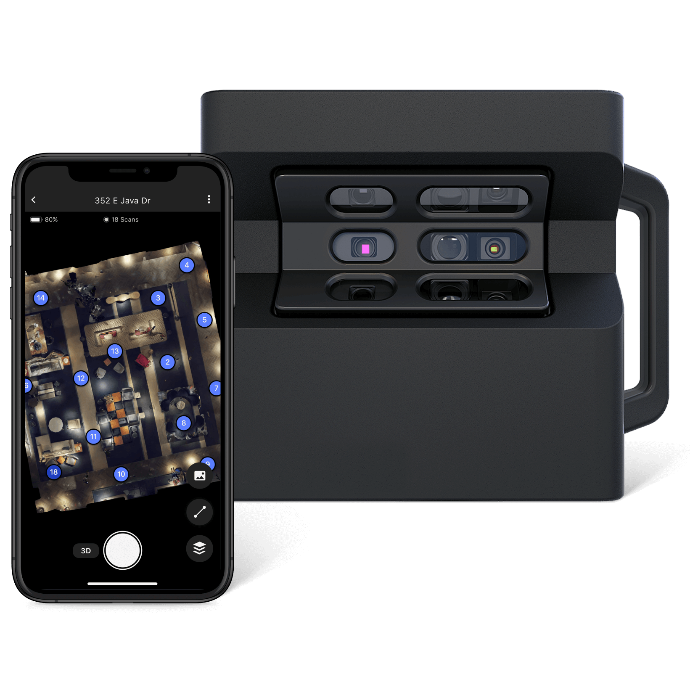
360 scan and digital twin capture
Capture rooms, factories, showrooms, hotels, retail spaces and construction sites with a clear scan plan.

Guided tour navigation
Create an experience that orients viewers, controls the route and makes the important zones obvious.

Mattertags, hotspots and media
Add notes, product details, photos, videos, links, safety instructions and call-to-action points inside the tour.

Spatial showcase video
Create highlight videos from the virtual space for websites, sales decks, exhibitions and social channels.

Photos, floor plans and sales assets
Export clean still images, floor plan references, thumbnails and marketing visuals from one spatial capture.

Any-device viewing
Publish a browser-based experience that works on desktop, mobile, tablet and large presentation screens.
Matterport + Reality AI Workflow
Capture the space once. Build a smarter content layer around it.
Matterport gives a strong spatial foundation: immersive tours, floor plans, still images and a digital twin that can support marketing, facility operations and construction documentation. Amaa adds the production layer: narrative, hotspots, sales content, AI-assisted descriptions and platform-ready assets.
AI-assisted labels
Room names, equipment labels, product groups and hotspot copy drafted faster.
Smart descriptions
Sales and training text for spaces, features, services and operating instructions.
Searchable knowledge
Structure the tour so teams can locate rooms, assets, safety notes and key information.
Content repurposing
Create website embeds, reels, screenshots, sales slides and training snippets.

Information Inside the Space
Hotspots turn a virtual tour into a guided business experience.
A space can explain itself when the right information appears at the right point: room details, product specs, equipment manuals, service videos, safety notes, booking links, sales forms and training instructions.
- Use text, photos, video, files and links inside the experience.
- Support sales, onboarding, training, inspection and remote collaboration.
- Prepare multilingual content and AI-assisted drafts when the space has many points of interest.
Use Cases
360VR for spaces that need trust before a visit.
A virtual space reduces friction when customers, partners or teams need to understand a location without being there.

Real estate and leasing
Apartments, villas, offices, warehouses, factories and commercial spaces for remote pre-qualification.

Travel and hospitality
Hotels, resorts, restaurants, venues and destinations that need immersive preview content.

Showroom and museum
Product showrooms, galleries, exhibitions, museums and experience centers with guided information.

Retail and supermarket
Store layout, shelf concepts, franchise formats and visual merchandising documentation.

Architecture and construction
Site documentation, progress capture, handover, design review and remote coordination.
Factories and facilities
Manufacturing areas, training routes, equipment zones, safety procedures and remote facility orientation.
Production Workflow
A reliable 360VR project is planned before the tripod opens.
We plan the viewer journey, scan path and content layer so the final tour is useful, not just technically captured.
01
Brief and purpose
Define sales, training, inspection, leasing or facility operation goals.
02
Space audit
Review access, lighting, cleaning, hiding sensitive information and scan points.
03
Capture plan
Choose Matterport, 360 camera, photo, video, drone or hybrid capture method.
04
On-site scan
Capture scan points, panorama details, reference photos and supporting media.
05
Tour build
Create navigation, highlights, floor plan flow, embed setup and branded presentation.
06
AI content layer
Draft room descriptions, hotspots, sales copy, training notes and multilingual text.
07
Review and secure
Check hidden areas, sensitive objects, brand accuracy and viewer path.
08
Publish and repurpose
Deliver embed links, images, video clips, sales materials and QR-ready tour links.
Engagement Models
Choose the spatial package around the business use case.
Final scope depends on space size, number of scan points, hosting, retouching, hotspot count, AI copy support, floor plan needs and delivery formats.
Quick 360VR Tour
For smaller spaces that need a clean, fast and shareable virtual walkthrough.
- 360 scan and tour build
- Basic navigation and info points
- Embed link and QR-ready URL
Matterport Digital Twin
For premium property, showroom, factory and facility presentation.
- 3D digital twin and walkthrough
- Mattertags, media and highlight path
- Images, floor plan support and sales assets
Reality AI Content System
For spaces that need smart labels, multilingual descriptions and training/sales content at scale.
- AI-assisted room and object descriptions
- Hotspot copy, scripts and guided tour notes
- Sales, training and facility knowledge layer
Send us the space, the goal and the audience. We will shape the digital twin.
Tell us the location type, approximate area, number of floors, use case, deadline and whether you need Matterport, custom 360VR, Mattertags, floor plans, Google Street View, AI-assisted descriptions or sales videos.